AI Levelpath · 2026
One assistant for an agentic platform
A universal assistant that carries context, calls the right skills and agents, and stays with the user through the whole journey.
Problem
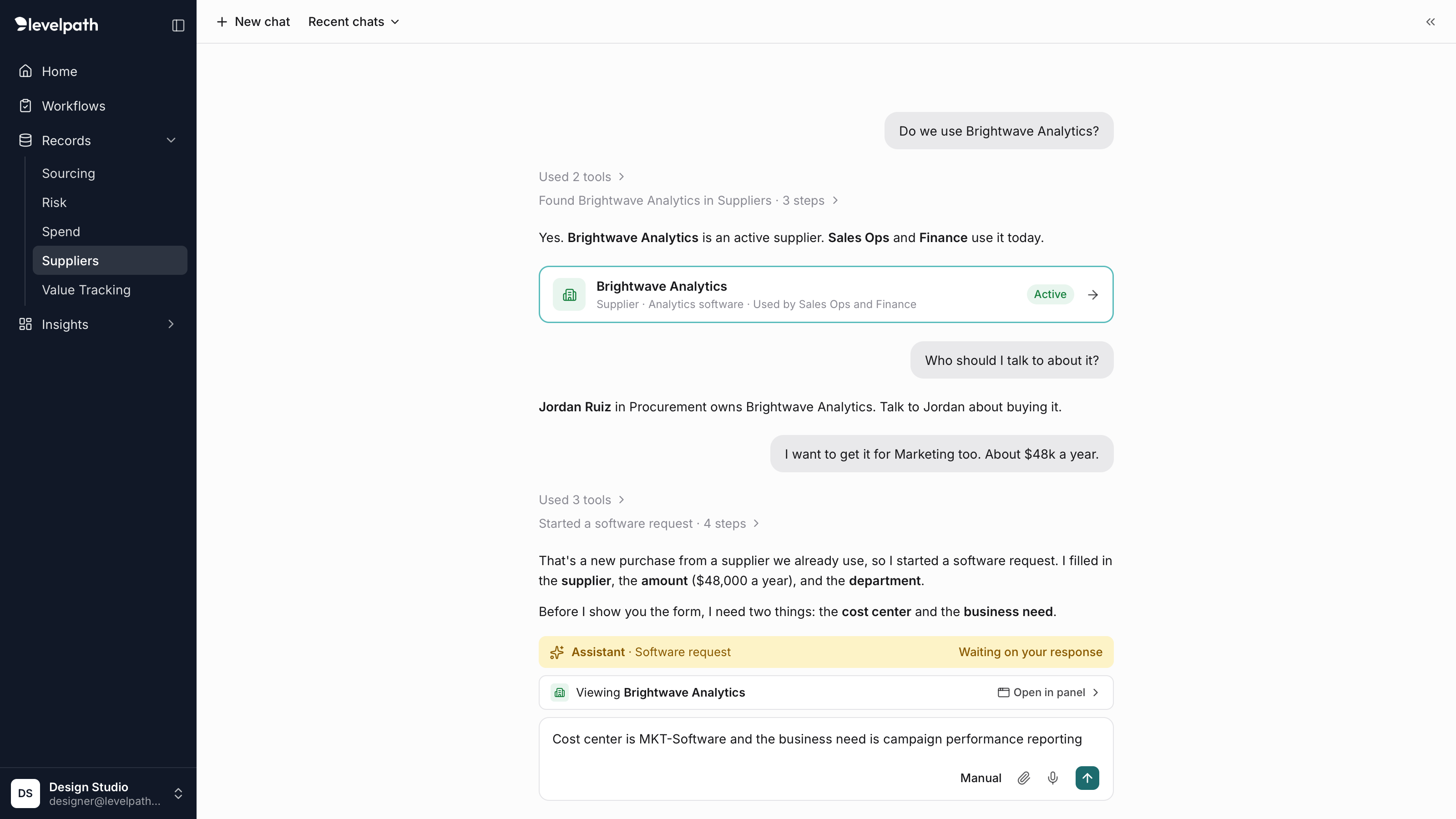
Levelpath had several page-level assistants that didn't share context, skills, or agents. When one couldn't do what people expected, they lost trust and had to go find another.
What I did
Owned the assistant end to end, from the first concept through final design, as the only designer on the project.
Outcome
Designs shaped by reviews with customer success, AI enablement, and product, and handed to engineering. The assistant was in development when my role ended.
The problem
Levelpath was rebuilding procurement around AI, and assistants had started appearing page by page. Each one lived on its own page and couldn’t share context, skills, or agents with the others.
That broke trust. Someone would ask an assistant to do something specific or look up a record, find it couldn’t, and have to go to a different page to use that page’s assistant instead. People had no way to know in advance which assistant could do what.
The people asking ranged from requesters and stakeholders across the company to admins, procurement managers, and approvers. They needed one place to ask, act, and understand what was happening.
What the assistant does
I designed one universal assistant to replace the isolated ones, built around three jobs:
- Keep and manage context. It knows what the user is looking at and what they’ve already said, so they don’t repeat themselves.
- Route the work. It calls the right skill or sub-agent and brings the result back into the conversation.
- Be the point of contact. However many agents are working behind the scenes, the user talks to one assistant.
I reviewed the designs with customer success, AI enablement, and the product team as they developed. Four themes came back: people don’t want to start at a blank input box; the assistant needs to feel like a different experience; people need subtle cues about what’s happening and when an agent needs them; and they need strong wayfinding, so they always know where they are and where things came from. Each of the decisions below answers one or more of those.
Key decisions
A docked panel that keeps the page in view
The assistant opens as a panel docked to the right that pushes the page over rather than covering it, and can expand to a full page. Using the main navigation collapses it, since the user has chosen to go somewhere else. To move between records without leaving the conversation, a record tray above the input shows what the assistant is looking at and opens it in a side panel, so the assistant stays open.
Pushing instead of overlaying kept the record and the conversation side by side, so both shared the same context. The anchored record also gave people a constant visual landmark for where they were in the app. And it matched what leadership wanted: customers should always see the record or page they’re working on while they work with the assistant.
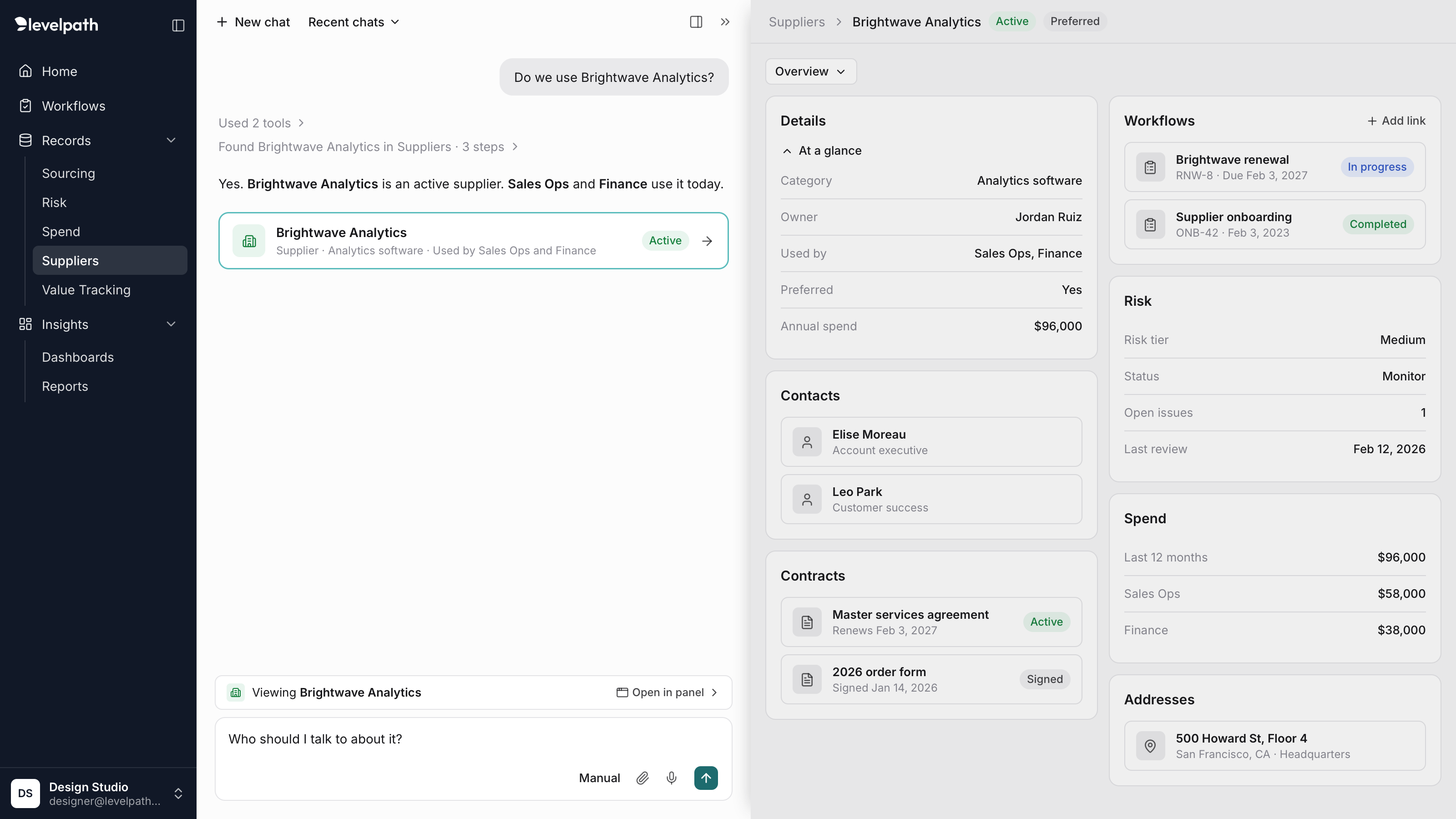
The assistant with a record opened from the tray. The record and the conversation stay side by side, and the assistant is in focus, so the record is tinted back.
No blank box
An empty input asks people to already know what the assistant can do, which is the trust problem all over again. So the assistant never opens empty. It greets people with a short line written for their role, then offers suggested prompts, quick actions, and their recent conversations with each one’s status.
The suggestions were meant to come from what the assistant knows about the person: their role, their function, and how they use Levelpath. That persona model was still in discovery when my role ended.
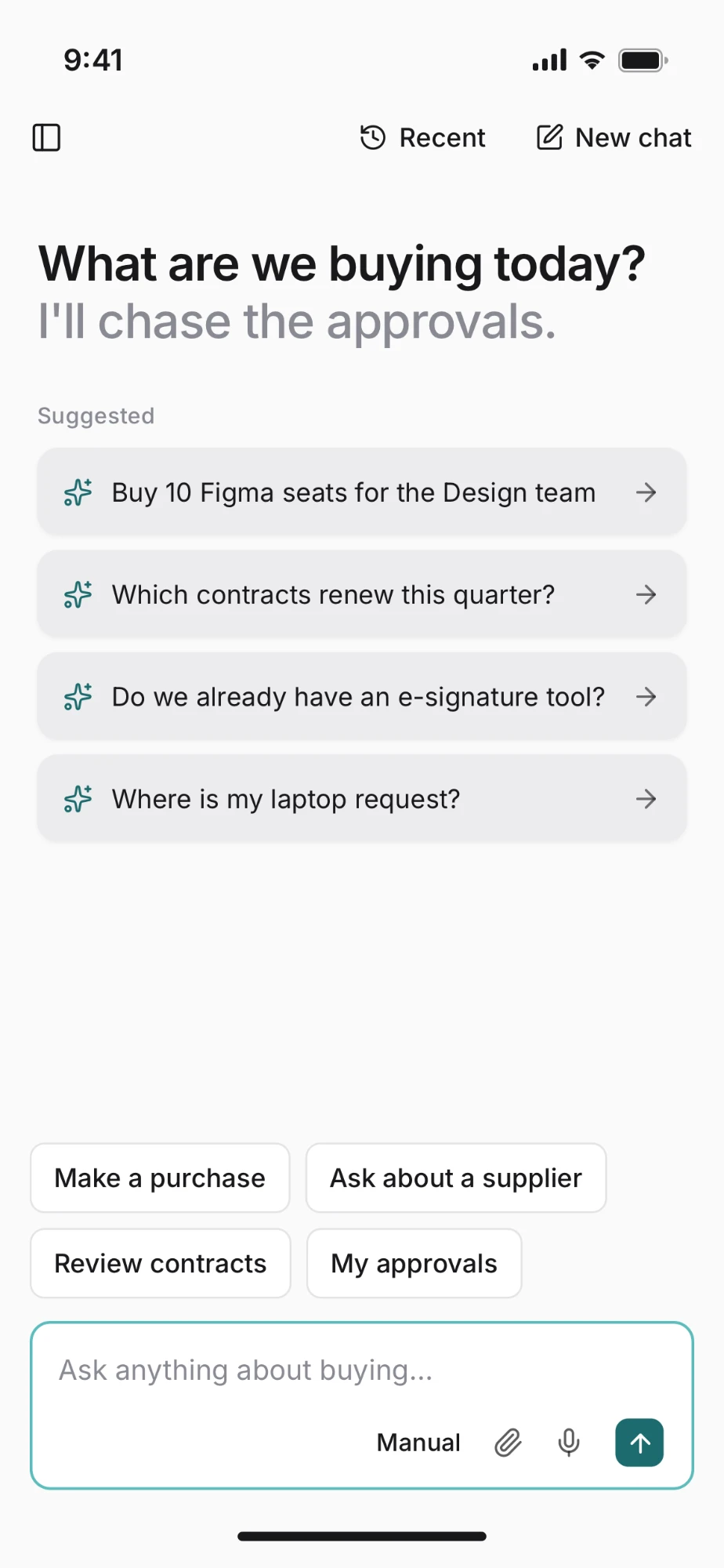
The empty state for a requester: a short, role-specific line, suggested prompts, and quick actions.
Focus decides the contrast
The assistant needed to feel like a different experience without fighting the page beside it. My first approach gave it a fixed background color, but it competed with the side panel, which used the same subtle gray. White was hard to work with and hard to show to customers. And reviewers kept telling us it was hard to know which surface to focus on, because so many areas competed for attention.
So contrast follows focus instead. Selecting the assistant brightens it and tints the record; selecting the record does the opposite. Elevation does the rest: a record opened in the side panel sits above the assistant, with a shadow along its left edge. At any moment, one surface is clearly the one you’re working in.
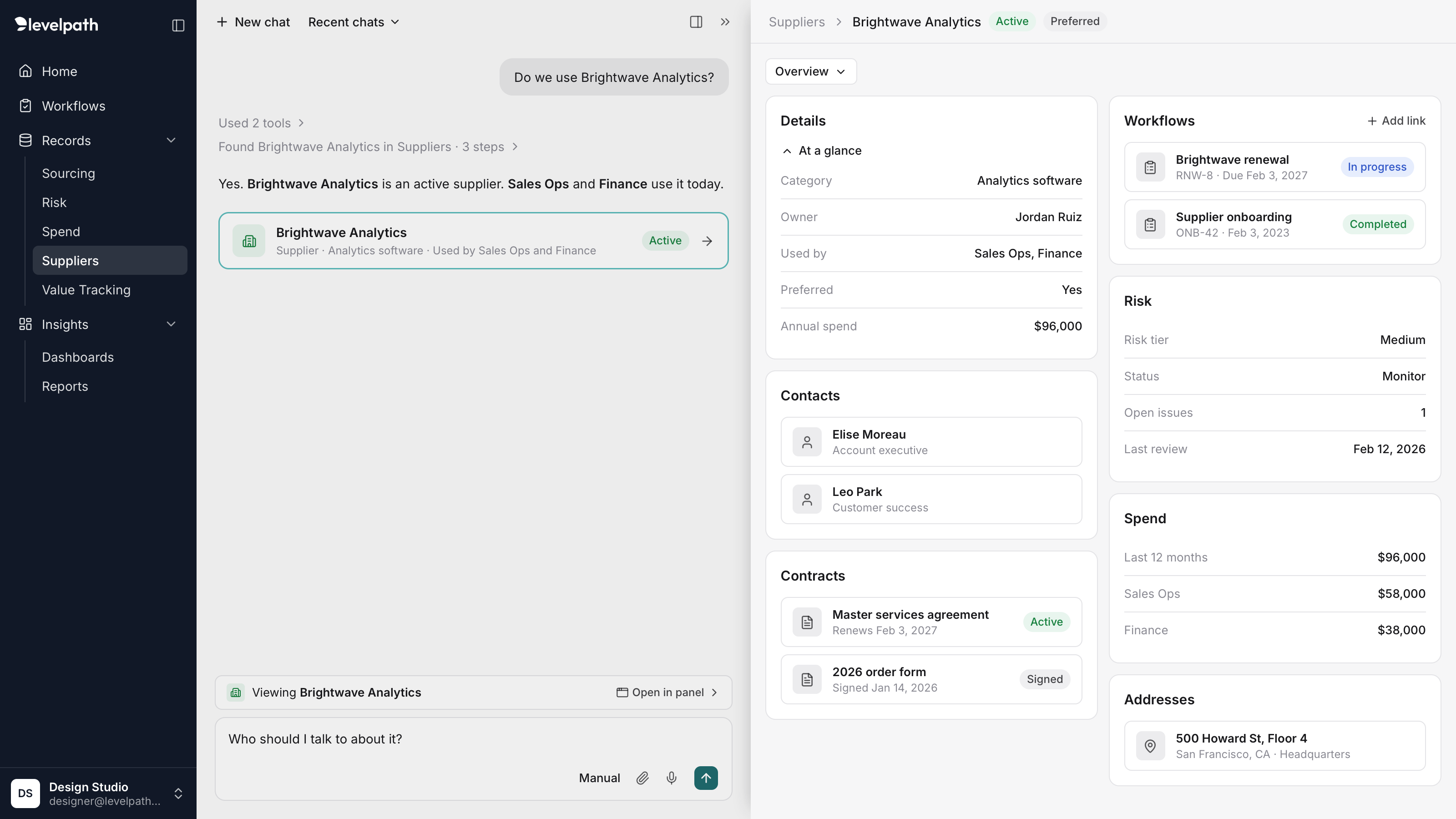
The same screen with the record in focus. Compare it with the screen above: the tint has moved to the assistant, and the record panel's shadow shows it sits a level above.
Where it was going: personas
The next step was making the assistant aware of who it was helping. A requester and a procurement manager asking the same question need different answers, different suggestions, and different levels of detail.
The persona would draw on:
- Job role, function, and department
- Owned categories and suppliers
- Approval authority and limits
- Open requests and recent activity
- How they actually use Levelpath over time
I also worked through an onboarding flow that would set up a persona from someone’s first session. This was still in discovery when my role ended, so none of it shipped. I’m including it because it shaped how I designed the assistant’s context model from the start. I never got to mockups at the time, so I rebuilt the frames below for this case study.
Onboarding is a conversation, not a setup form. Most of the work was in the prompts, not the UI. Levelpath already knows someone’s permissions, approval limits, and categories, so the assistant confirms those instead of guessing or starting from scratch. People can answer, or ignore the question and ask something else.
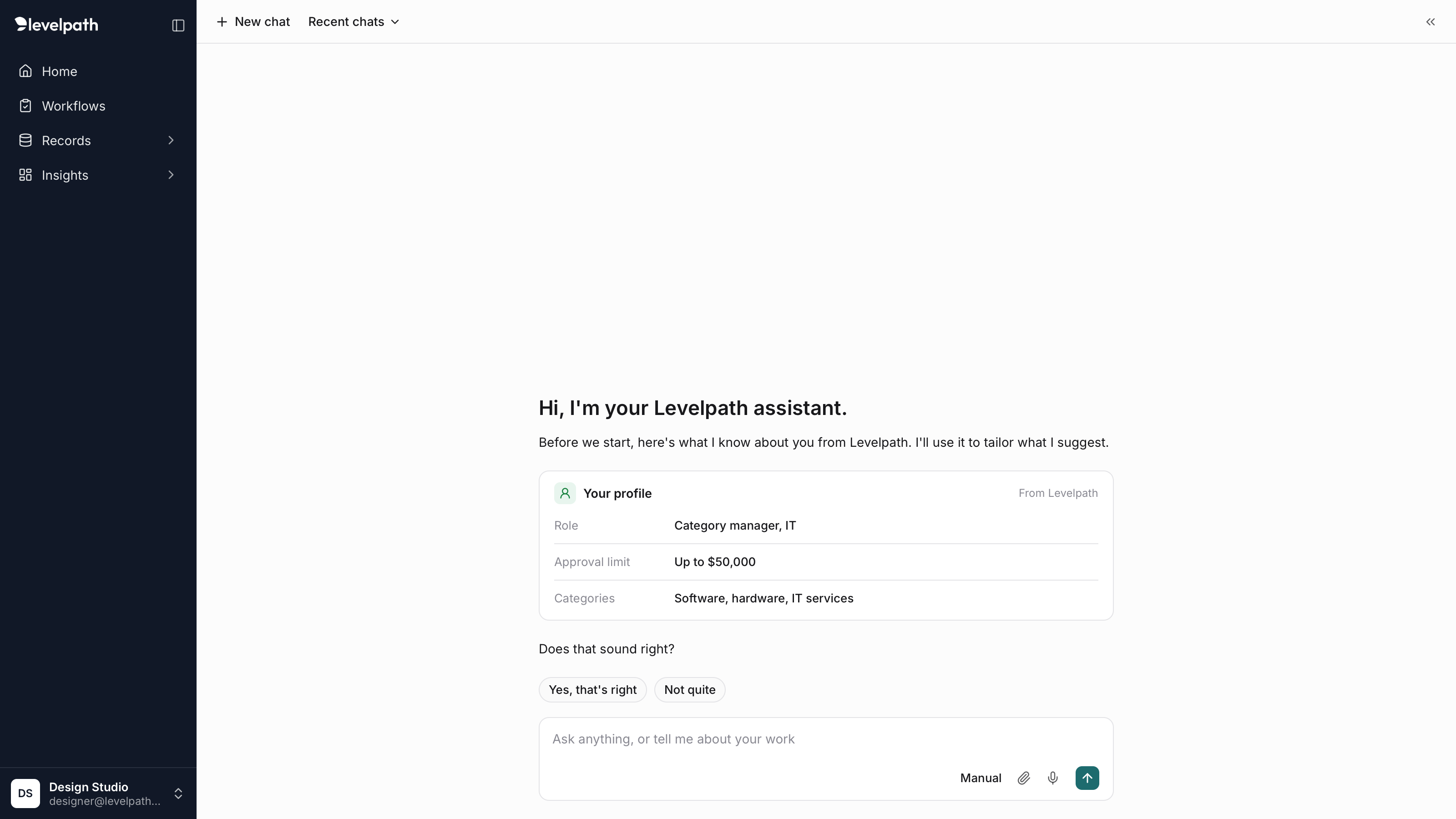
First run: the assistant shows what it already knows from Levelpath and asks the user to confirm it.
From there the persona builds over time. When the assistant notices a pattern, it asks in a note above the input, so the question stays out of the conversation and can be dismissed.
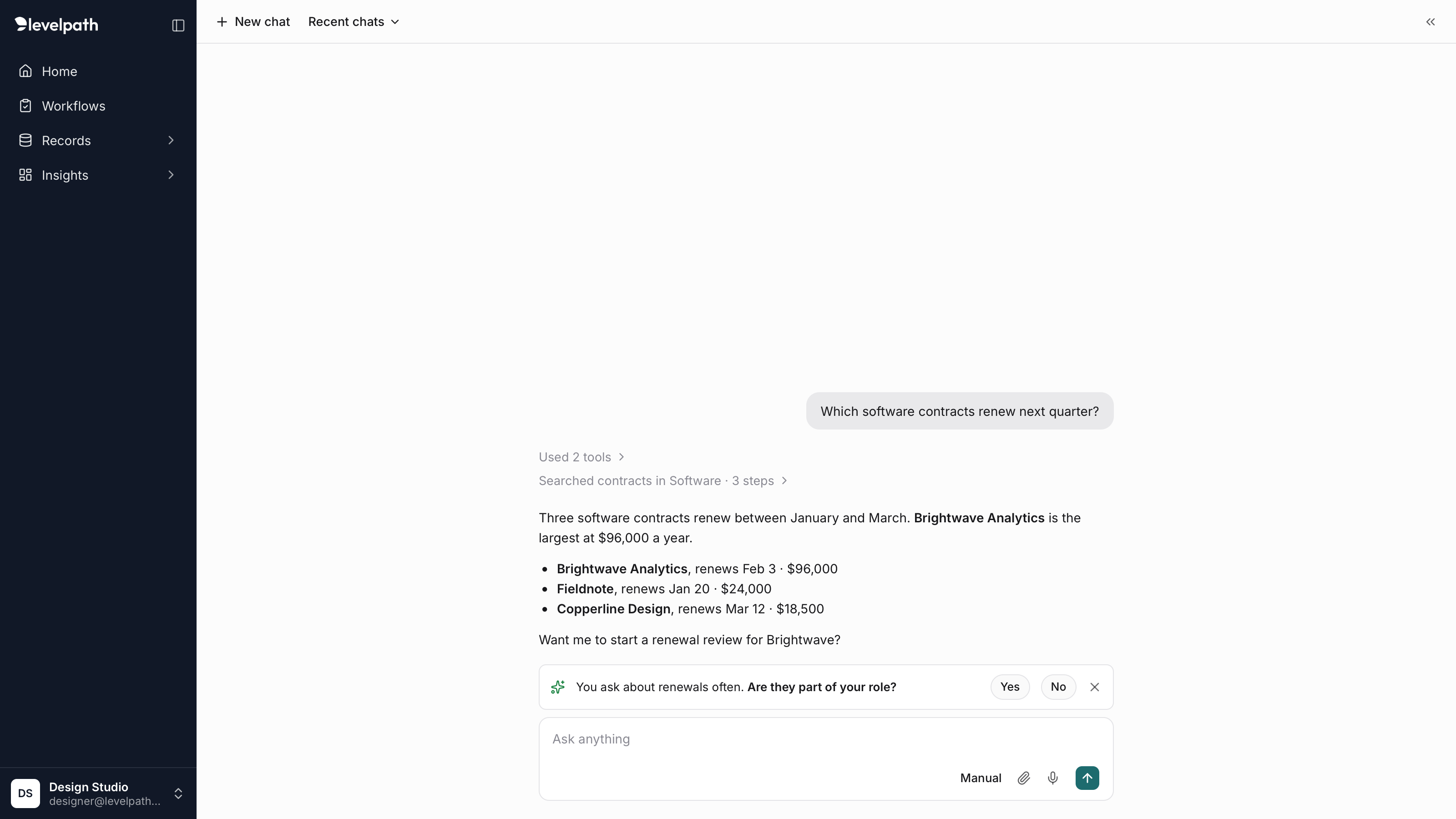
A check-in after a pattern of renewal questions, kept apart from the answer.
People can always ask what the assistant knows about them. The answer keeps what came from their Levelpath profile, which only an admin can change, apart from what the assistant learned from how they work, which they can remove.
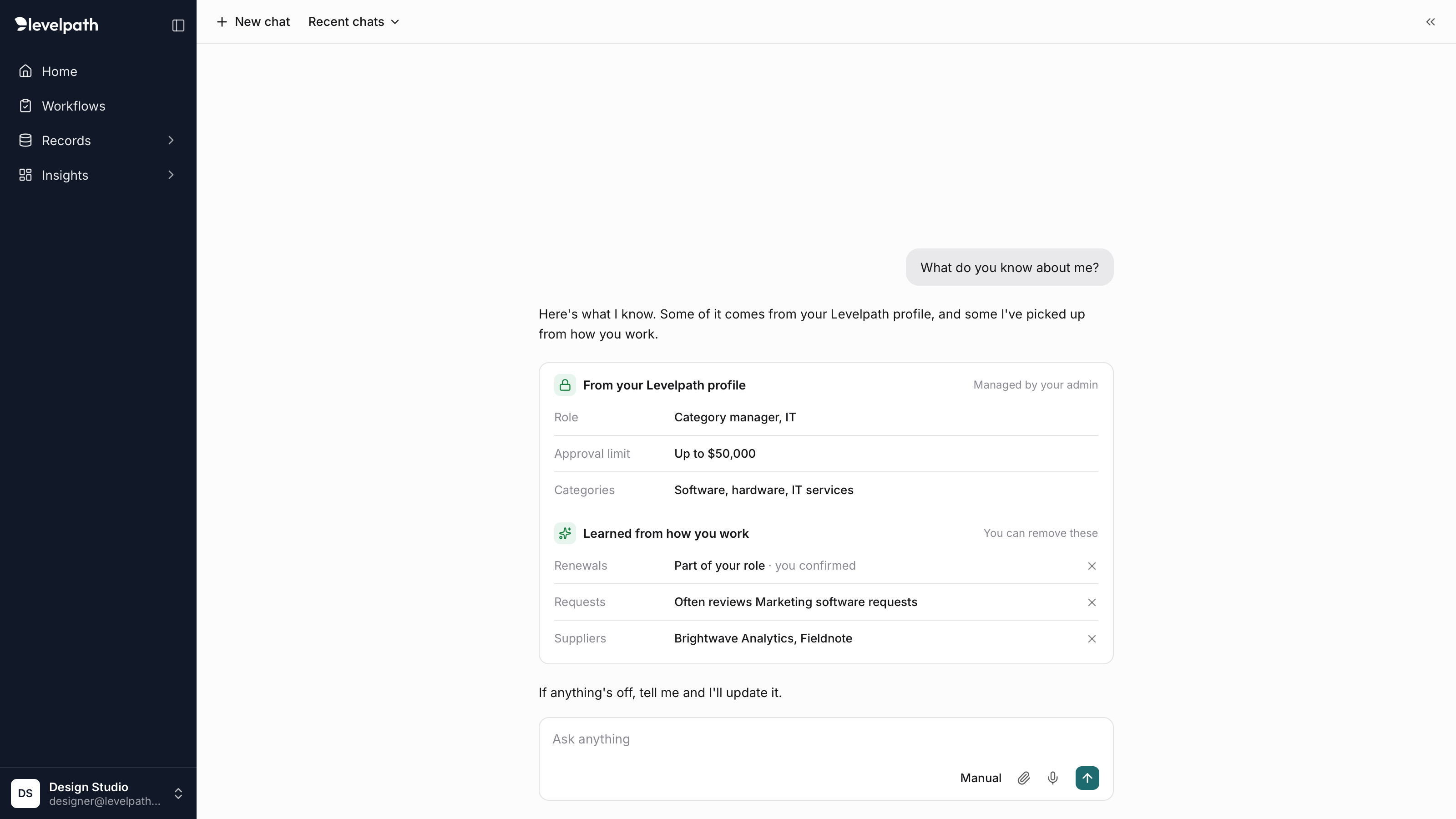
What the assistant knows, split by where it came from.
Reflection
Consolidate from the start. The isolated assistants were the root of the trust problem. I’d push for one universal assistant from the very first release.
Test navigation with customers early. We validated with internal stakeholders, but our assumptions about how people would move between the assistant and the rest of the app deserved customer prototype testing much sooner.