AI Levelpath · 2026
Making agent work visible
Agents in a procurement workflow were doing real work out of sight. I designed how users talk to them and how that work shows up.
Problem
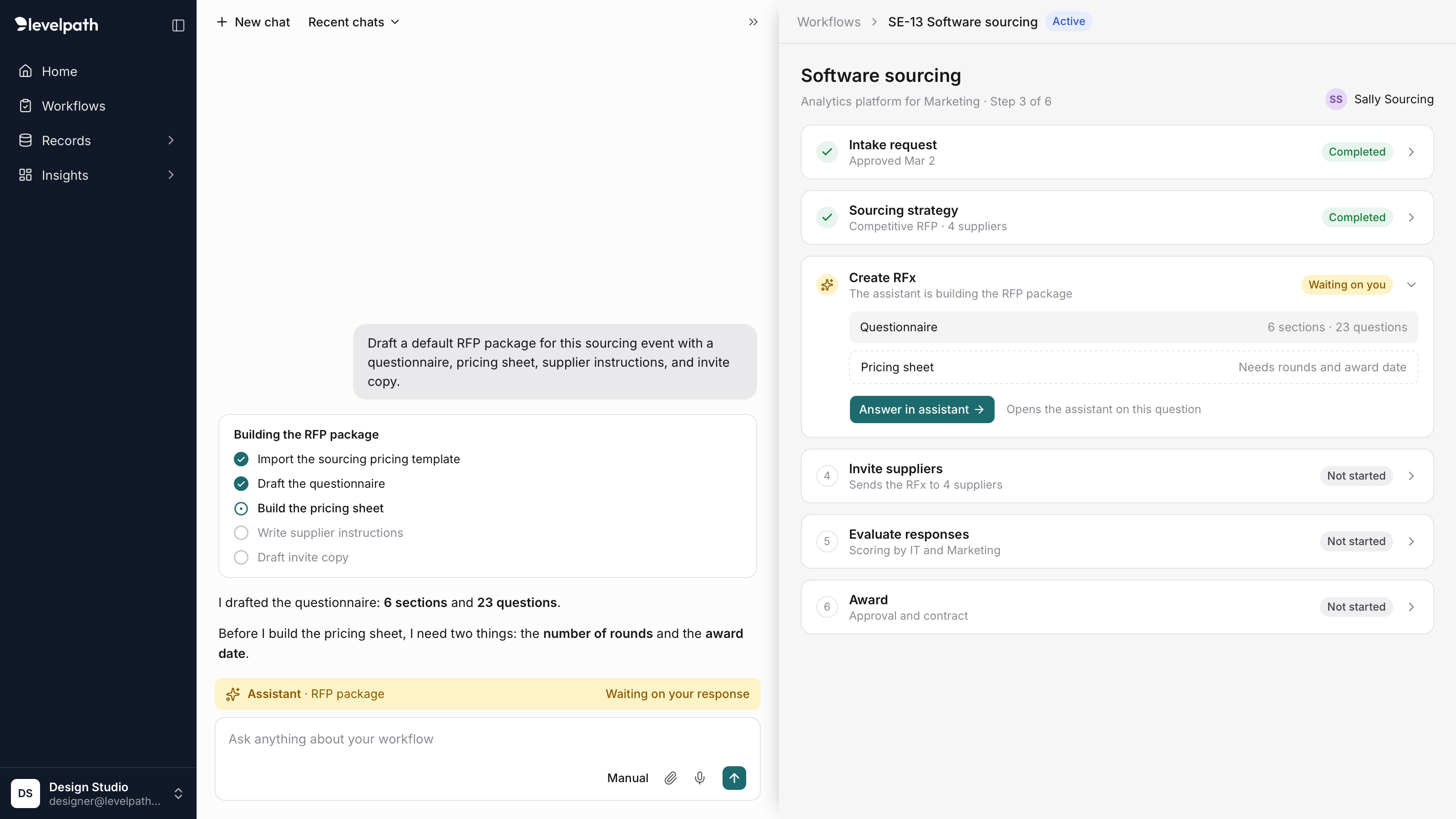
Sub-agents ran inside Levelpath's workflow engine and stopped when they needed input, but their requests were vague and showed up in two places that weren't linked.
What I did
Designed the conversation model between the user, the assistant, and agents, plus how progress and notifications surface.
Outcome
Designs handed to engineering. The work was in development when my role ended.
The problem
Levelpath’s workflow engine got an agentic node: sub-agents, configured and prompted in the platform, that did procurement work as part of a workflow. To get anything done they had to work through the universal assistant.
Agents would run a job, then stop when they needed something from the user. The request was often a vague “Agent needs your input,” with no clear next step. And it could appear twice: once in the assistant and again on the workflow step card. The two copies weren’t linked, so people couldn’t tell whether they were looking at one request or two, or where they were supposed to answer.
What I owned
Three questions:
- Who are you talking to? How a user communicates with agents, and how that relates to the assistant.
- What is it doing? How we show an agent’s progress and completed work.
- When should you look? How we tell the user that something happened without burying them in noise.
Key decisions
One voice: the assistant
The user always talks to the assistant. The assistant is the coordinator: agents talk to it, and it relays what they need to the user and the user’s answers back to them. People don’t need to know a job was handed to a separate agent, so the interface never asks them to keep track of which one is speaking.
That also fixed the vague request. Because the assistant relays the message, it can say exactly what it needs in plain words, like “I need the number of rounds and the award date,” instead of a generic “needs your input.” While it waits, a bar above the input says the assistant is waiting on the user.
Linked, not duplicated
The request still shows in two places, because people work in both. But now the two are one request. The step card shows that it’s waiting on the user and what’s missing. If the assistant is collapsed, clicking the step reopens the assistant on that exact question. Answer once, and both clear.
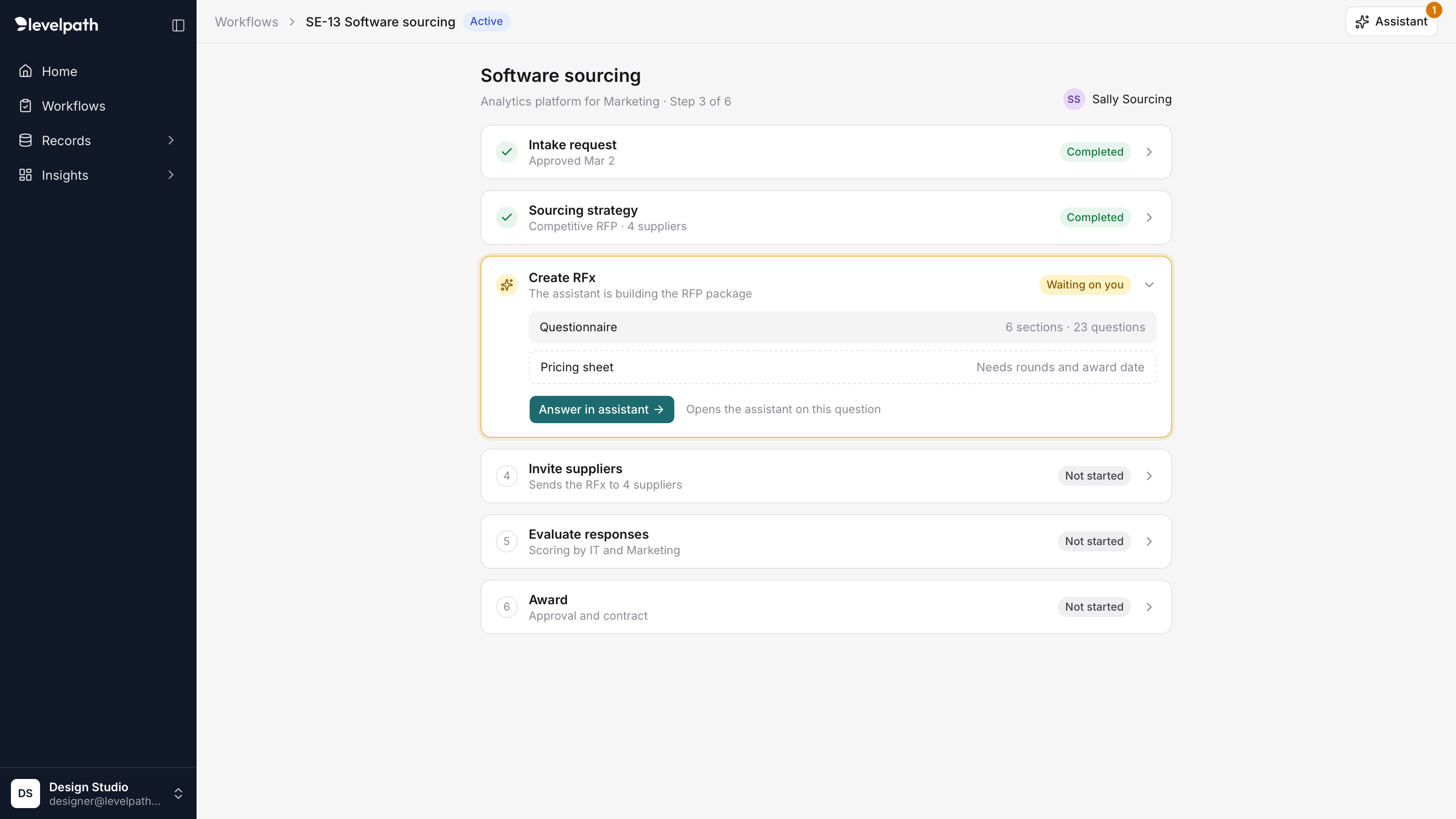
With the assistant collapsed, the step card still carries the request and opens the assistant right on it.
Show the work where it happens
Progress lives in the conversation, as a flat checklist card. Finished steps get a check, the current step a filled circle, and upcoming steps an empty one. It’s the same pattern the assistant uses everywhere else, so agent work doesn’t need a new way of reading.
Notify only when it matters
The assistant notifies people when it needs their input or finishes a job, and nothing else. Notifications appear in the notification bell, as a badge on the assistant button, and by email. Progress steps never notify, so a long job doesn’t turn into a stream of alerts.
Reflection
One voice makes agents manageable. People shouldn’t have to manage who’s doing the work. When the assistant speaks for every agent, adding agents doesn’t add complexity for the user.
Make the wait visible, quietly. An agent working out of sight feels broken. Progress needs to stay in view without competing for attention.
Test treatments with customers early. I’d put different treatments for progress and requests in front of customers much sooner, to learn what draws attention without distracting, and where people get held up.